
Prototype #1: Storyboard & Wireframe
INFO691 Prototyping the User Experience @ Drexel Univerisity
Project Manager, Product Designer
Angel Martens, Courtney Chan, Dezuray Logan
Product Description
Our product is an online outfit shopping website that connects shoppers with professional fashion advisors and buyers to create a more personalized and guided shopping experience. It allows users to interact through distinct roles: shoppers looking for outfit recommendations, advisors creating outfits, and buyers fulfilling the final purchases, within a single cohesive interface.
Purpose
The purpose of this system is to simplify the process of finding and purchasing outfits by using expert styling advice and combining it with convenient online shopping. This system aims to provide users with curated outfits suggested that reflect their personal tastes and needs, while minimizing the time and effort required to search for items individually, on their own. This system also creates opportunities for fashion advisors to provide tailored services remotely.
Functionality
Shoppers can store their size, style, color, and fabric preferences, view and approve outfit suggestions from fashion advisors, and place orders for selected outfits. Fashion advisors used saved preferences to create personalized outfit concepts and confirm selections with shoppers before sending them to the buyer. Once approved, professional buyers locate the outfit items online, organize the details, and send the order details back to the shopper to purchase. Additional features include secure payment options and communication tools that support a seamless, end-to-end shopping experience.
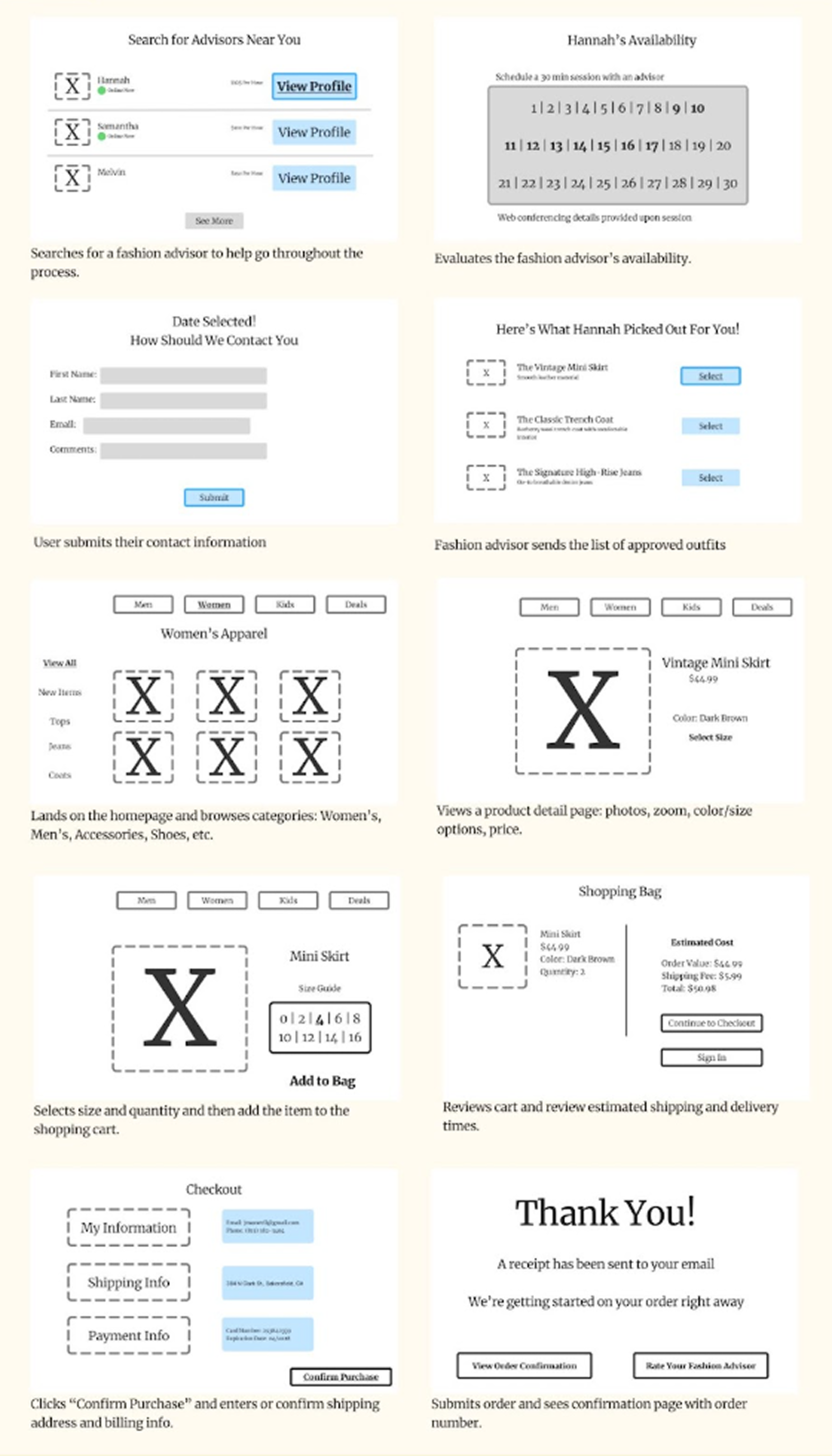
Storyboard by Angel Martens
Fashion Shoppers Storyboard
Lands on the homepage and browses categories: Women’s, Men’s, Accessories, Shoes, etc.
Views a product detail page: photos, zoom, color/size options, price.
Selects size and quantity and then add the item to the shopping cart.
Reviews cart and review estimated shipping and delivery times.
Clicks “Checkout” or “Buy Now” and enters or confirm shipping address and billing info.
Submits order and sees confirmation page with order number.
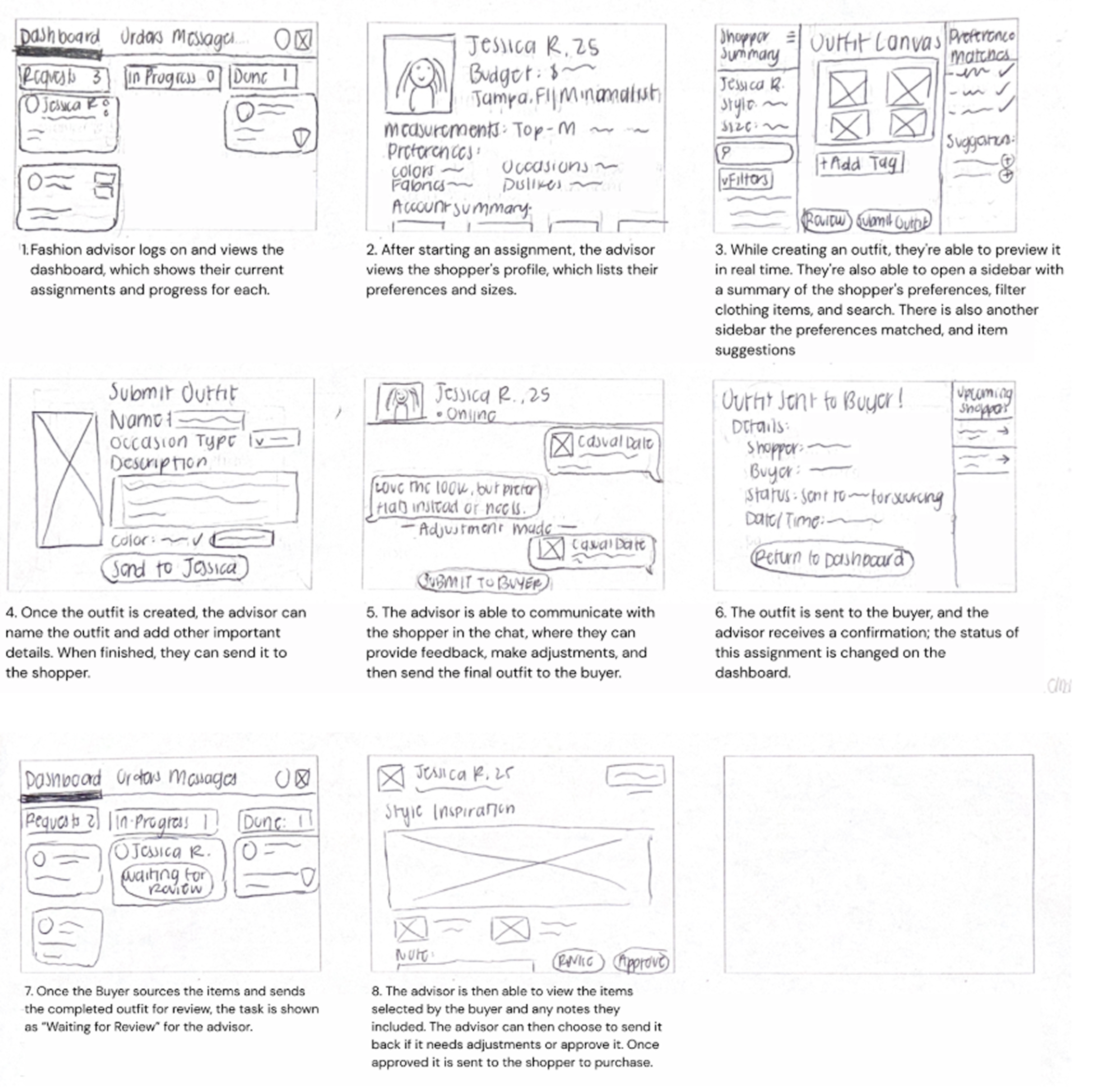
Storyboard Flow by Dezuray Logan
Professional Fashion Advisor Storyboard
Fashion advisor logs on and views the dashboard, which shows their current assignments and progress for each.
After starting an assignment, the advisor views the shopper's profile, which lists their preferences and sizes.
While creating an outfit, they're able to preview it in real time. They're also able to open a sidebar with a summary of the shopper's preferences, filter clothing items, and search. There is also another sidebar of filter suggestions that corresponds to the shoppers' preferences and specific items that fit these guidelines.
Once the outfit is created, the advisor can name the outfit and add other important details. When finished, they can send it to the shopper.
The advisor is able to communicate with the shopper in the chat, where they can provide feedback, make adjustments, and then send the final outfit to the buyer.
The outfit is sent to the buyer, and the advisor receives a confirmation; the status of this assignment is changed on the dashboard.
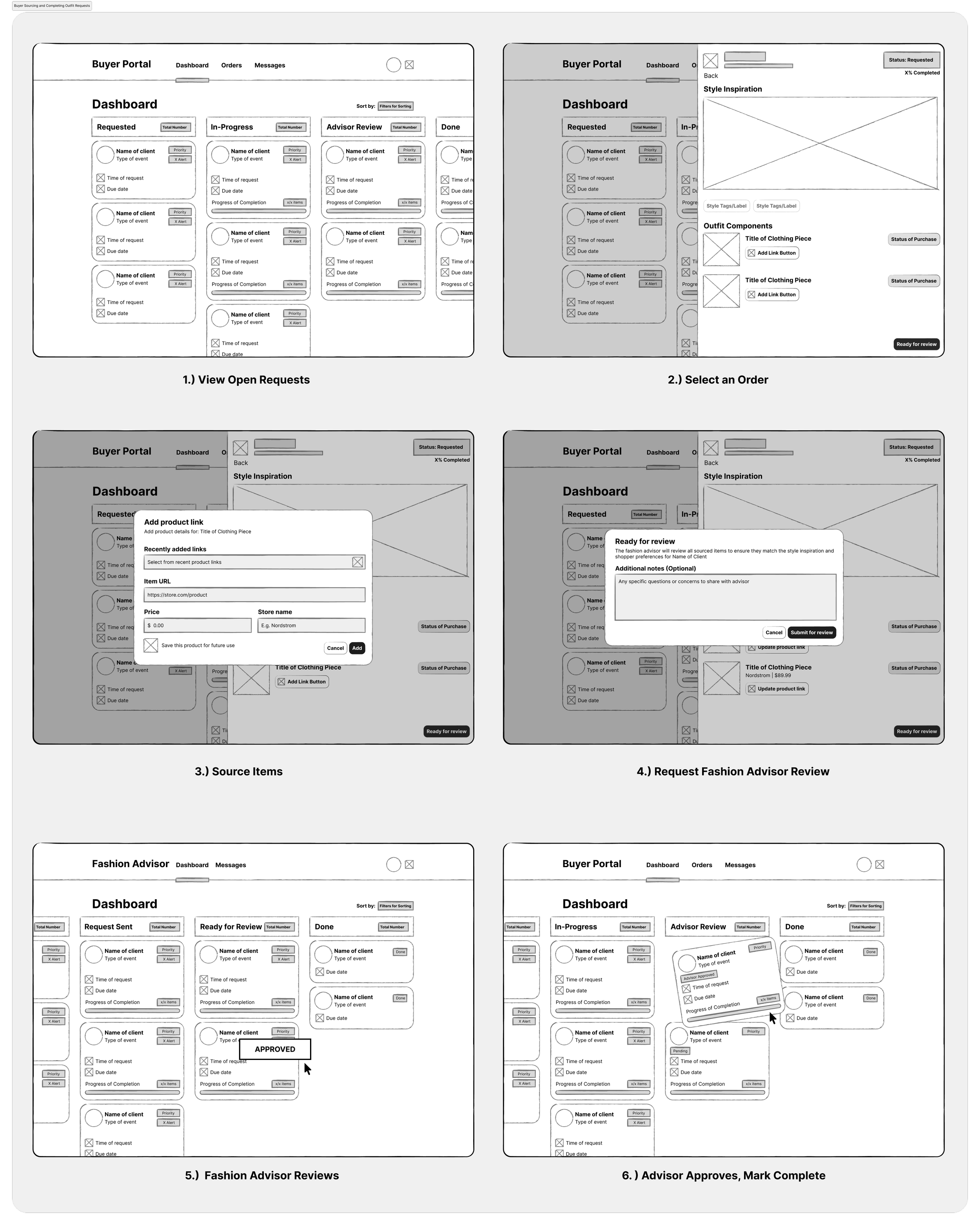
Storyboard Flow by Courtney Chan
Professional Buyer Storyboard
View Open Requests
Select an Order
Source Items
Request Fashion Advisor Review
Fashion Advisor Reviews
If Approved, Mark Complete

User Feedback
Overall Impressions
The end-to-end experience felt cohesive, logical, and aligned with typical online shopping expectations.
Users liked the inclusion of a fashion advisor, which added legitimacy and personalization to the process.
Storyboards were cohesive, with screens that built on each other effectively.
Shopper Feedback
Found the browsing and ordering process simple and intuitive.
Payment steps were clear and easy to follow.
Suggested adding a preference selection feature to better personalize the experience.
Recommended including a transition screen showing what the advisor selected before reaching the apparel section.
Praised the Shopping Bag and Checkout pages for being informative and cohesive.
Fashion Advisor Feedback
Found the interaction flow between advisor and shopper clear and easy to follow.
Appreciated the focus on user preferences (likes, dislikes, colors, events).
Liked the ability to confirm outfit selections with shoppers before finalizing.
Suggested adding price visibility for outfit assembly and estimated delivery times.
Professional Buyer Feedback
Found the Open Requests screen well-organized and clear.
Noted risk of errors or delays if buyers enter incorrect info or wait too long for confirmation.
Suggested automation or pre-filled product data to reduce manual errors.
Recommended adding a feature to request additional information if certain items aren’t available.
Improvement Ideas
Add a user profile page for viewing past purchases.
Include an outfit preview on a model instead of just a collage.
Streamline communication between advisor and buyer to reduce back-and-forth delays.

Mid-Fidelity Wireframes
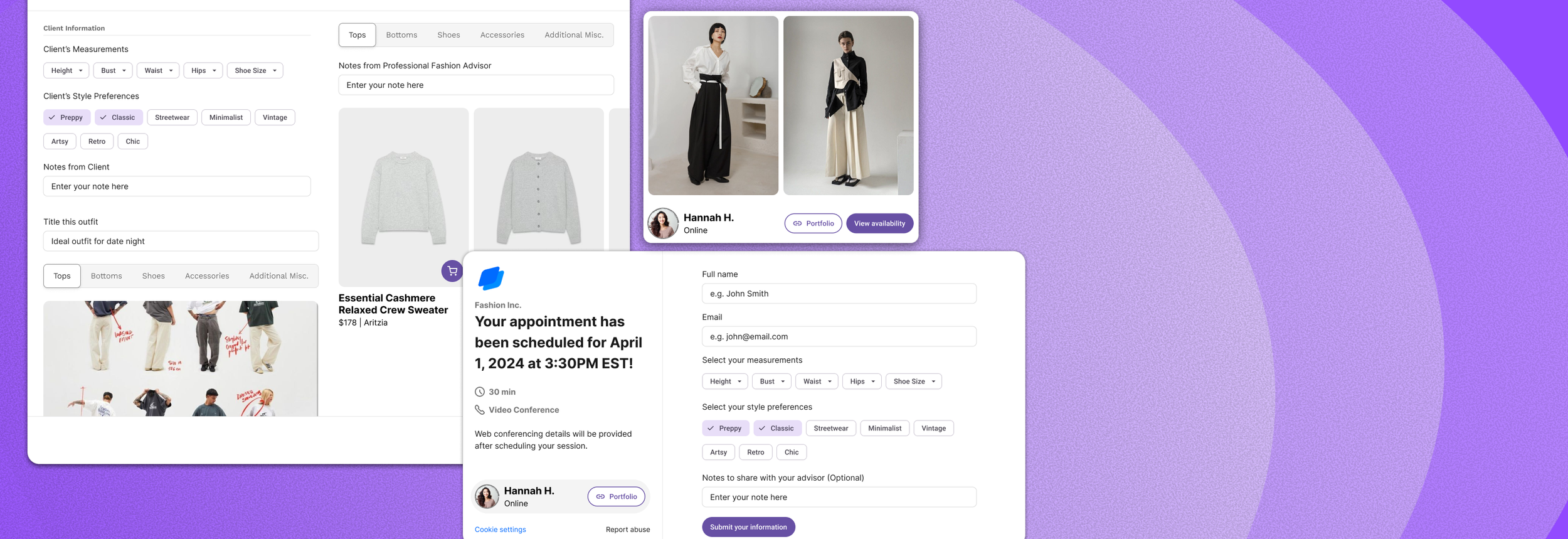
Shopper finds fashion advisors and purchases clothes from fashion advisor
The primary design decision for the shopper was focused on helping users identify advisors in their area that can assist them in their shopping process. Each screen builds on the previous one and ensures that users have a multitude of options for advisors that meet their needs. In conjunction with that, it was integral to allow the shoppers to have multiple outfit options, such that they can easily pinpoint the product that most resonates with them. The fashion advisor flow was designed to show the advisor's role in creating personalized outfits that reflect the shopper's preferences for style, color, occasion, and more. We included a confirmation step that allows the advisor to review and make any adjustments with the shopper's input before sending it out, ensuring collaboration and satisfaction. Consistent layouts and navigations were used across all roles to create a streamlined experience. When implementing the kanban-style dashboard for both the Fashion Advisor and Professional Buyer, it helped visualize and manage their ongoing requests. This layout created a clear sense of workflow, moving tasks through stages such as Requested, In Progress, Under Review, and Completed. The kanban format also helped align both roles under a shared mental model of progress, improving efficiency in the process.
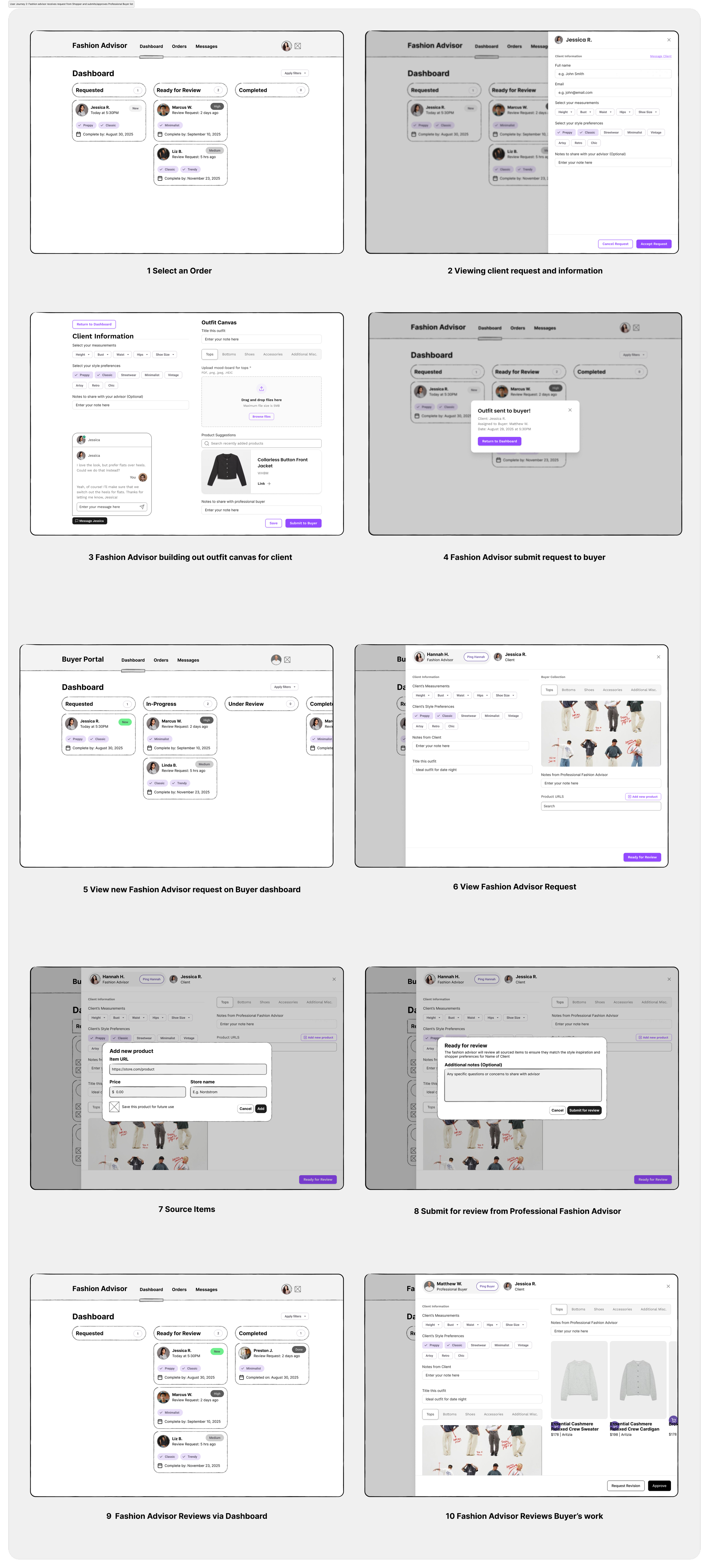
Mid-Fidelity Wireframes
After analyzing the work that we’ve completed, our process mainly entailed making sure that the dynamic between the shopper, advisor and buyer ran as smoothly as possible.
This meant prioritizing user preferences and ensuring that shoppers had a variety of products to choose from. Also, an important aspect of the process was placing the least amount of burden on the shopper. Throughout our process, our main goal was to generate a channel that maintains good communication between all of the necessary components. During development, our goal was to create a balance between efficiency for the advisor and personalization for the shopper. We structured the flow so advisors could easily access the shoppers' preferences, filter through clothing options, and communicate updates clearly. Maintaining cohesion with the shopper and buyer flows helped visualize how information and actions move effortlessly between all three roles. Looking back, the process would’ve benefitted from establishing a clear information hierarchy map early on, before moving into sketching and wireframing. While storyboarding helped visualize each step of the journey, it became clear that mapping the relationships between the three different storyboards would speed up the design process - which is what we ended up doing even though it was not explicitly mentioned in the project requirements. The iterative process still proved valuable, as each storyboard informed the other, but a more deliberate hierarchy mapping could have made all three user experiences a lot more cohesive.
The user feedback that we gathered with our two participants was a crucial element of developing our storyboards, such that they reflect the needs that many users will have.
Going more in depth, our users expressed valid concerns, such as the back-and-forth situation between the roles which can convolute the process at times. Moreover, our users also gave critical descriptions as to where our designs could use more information, in order to make our work more intuitive. User feedback confirmed that the advisor flow was intuitive, with particular appreciation for the confirmation feature and its focus on shopper preferences. However, participants suggested including price visibility and multiple item options within the advisor view to improve flexibility and efficiency. These insights allowed us to make the advisor experience more transparent and responsive. User feedback strongly influenced the refinement of the kanban system. Fashion Advisors appreciated the clarity of having all client requests displayed in one view but suggested including price visibility while building outfits. This piece of feedback was integrated directly into the product view.